

An XML sitemap helps search engines discover important pages on your website. It provides a structured list of URLs so search engine crawlers can understand which pages are available for crawling and indexing. A properly maintained sitemap is especially useful for large websites, new websites, and websites that regularly publish or update content.
However, simply creating an XML sitemap is not enough. You also need to make sure it contains the correct URLs, excludes unnecessary pages, and stays updated when your website changes.
In this guide, you will learn how XML sitemap optimization works, which URLs to include, how to create a sitemap using Rank Math, and how to submit it to Google Search Console and Bing Webmaster Tools.
What Is XML Sitemap Optimization?
An XML sitemap is a file that lists important URLs on your website in a format that search engines can understand. It usually uses XML tags to provide information about each URL, including its location and, when available, its last significant modification date.
For example, a basic XML sitemap entry looks like this:
<url>
  <loc>https://example.com/about-us/</loc>
  <lastmod>2026-10-20</lastmod>
</url>
Here:
<loc>contains the full URL of the page.<lastmod>indicates when the page was last significantly updated.
XML sitemap optimization means maintaining this file so it includes the correct, important, indexable URLs and does not contain unnecessary or problematic pages.
A sitemap does not guarantee that Google will crawl or index every listed URL. It helps search engines discover your pages, while indexing decisions depend on several other factors.
Why Is an XML Sitemap Important for SEO?
Search engines discover pages by following links and using other discovery methods. An XML sitemap provides an additional way to find important website URLs.
It can be particularly helpful in the following situations:
1. Helps Discover Important Pages
A sitemap gives search engines a list of important URLs, including pages that may not receive many internal links.
2. Supports Website Indexing
When you publish a new blog, service page, or product page, including its URL in your sitemap can help search engines discover it.
3. Helps Manage Large Websites
Websites with hundreds or thousands of pages can use sitemap files to organize their URLs and make discovery easier to manage.
4. Provides Update Information
The <lastmod> tag can communicate when a page was last significantly modified. This information can help search engines understand which content has changed.
5. Supports Image and Video Discovery
Specialized sitemap extensions can provide additional information about images and videos, helping search engines discover rich media content.
An XML sitemap is an important technical SEO element, but it does not directly guarantee higher rankings. Your website still needs useful content, proper internal linking, good technical health, and a clear site structure.
How Does an XML Sitemap Work?
An XML sitemap works as a discovery guide for search engine crawlers.
When a sitemap is available, search engines can access its URLs and decide which pages to crawl. They can also use the information provided in the sitemap to understand when certain pages were last updated.
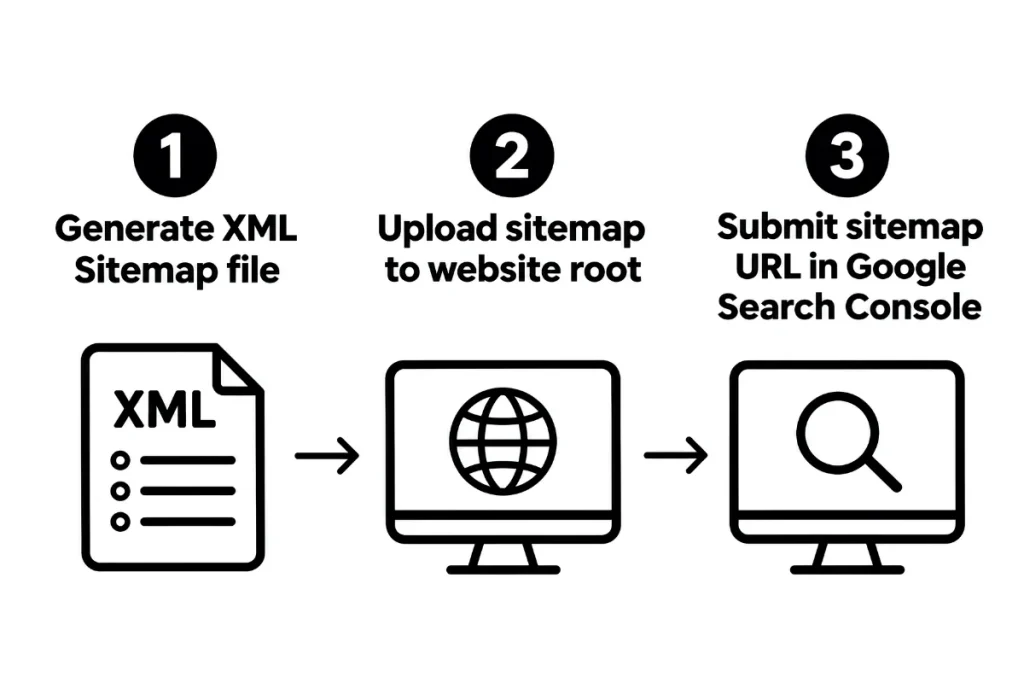
Here is the basic process:
- You create an XML sitemap for your website.
- You add the sitemap location to your robots.txt file or submit it through search engine webmaster tools.
- Search engines discover and read the sitemap.
- Crawlers evaluate the listed URLs.
- Search engines decide which pages to crawl and potentially index.
XML Sitemap Best Practices for Better SEO
Creating a sitemap is only the first step. Following these practices helps keep it accurate and useful for search engines.
1. Include Only Canonical URLs
Your sitemap should contain the preferred, canonical version of each important page.
For example, if these URLs show the same content:
https://example.com/services/https://example.com/services/?source=campaign
You should generally include only the canonical URL in your sitemap.
Avoid adding duplicate URLs, tracking parameters, session IDs, and unnecessary filtered URLs.
2. Exclude Non-Indexable Pages
Your sitemap should focus on pages that you want search engines to discover and potentially index.
Avoid including:
- Pages with a
noindexdirective. - URLs that return 404 or 500 errors.
- Redirected URLs.
- Duplicate pages.
- Private or admin pages.
- Unnecessary search and filter result pages.
Including non-indexable URLs can create conflicting signals and make sitemap maintenance harder.
3. Keep Your Sitemap Updated
Whenever you publish important new content, update existing pages, or remove outdated URLs, your sitemap should reflect those changes.
Most modern SEO plugins and CMS platforms can generate and update sitemaps automatically.
For example, WordPress users can use Rank Math or Yoast SEO to manage their XML sitemaps.
4. Use Accurate Last Modified Dates
The <lastmod> tag communicates when a page was last significantly updated.
Use genuine modification dates instead of changing the date every time the sitemap is regenerated. Incorrect dates reduce the usefulness of this information.
Google may use accurate lastmod values as a signal when deciding whether to recrawl a page.
5. Follow Sitemap Size Limits
A single XML sitemap file can contain a maximum of:
- 50,000 URLs.
- 50 MB in uncompressed file size.
If your website exceeds either limit, divide the URLs into multiple sitemap files and use a sitemap index file to organize them.
For example:
sitemap_index.xml
    ├── page-sitemap.xml
    ├── post-sitemap.xml
    ├── product-sitemap.xml
    └── category-sitemap.xml
This structure is useful for large WordPress and e-commerce websites.
6. Add Your Sitemap to robots.txt
You can mention your sitemap location inside your website’s robots.txt file.
Example:
User-agent: *
Disallow: /wp-admin/

Sitemap: https://example.com/sitemap_index.xml
Replace the example URL with your actual sitemap address.
This gives search engine crawlers another way to discover your sitemap.
7. Use Image and Video Sitemap Extensions When Needed
If your website publishes many important images or videos, specialized sitemap extensions can provide additional information about this media.
Image sitemap information can help search engines understand images associated with your pages. Video sitemap information can provide details such as video titles, descriptions, and thumbnails.
These extensions are particularly useful for websites where image and video search visibility matters.
How to Create an XML Sitemap in WordPress Using Rank Math
WordPress users can create an XML sitemap without manually writing XML code. Rank Math provides built-in sitemap settings that make the process easier.
Follow these steps:
Step 1: Install and Activate Rank Math
Log in to your WordPress dashboard. Go to Plugins → Add New Plugin, search for Rank Math SEO, and install and activate it.
Step 2: Open Sitemap Settings
Navigate to Rank Math SEO → Sitemap Settings.
You will find options for managing different sitemap types.
Step 3: Enable Sitemap Functionality
Make sure the sitemap feature is enabled.
You can also configure which content types should appear in the sitemap, such as:
- Posts
- Pages
- Products
- Categories
Choose only the content types that contain useful, indexable URLs.
Step 4: Configure Sitemap Options
Review the settings for images, posts, pages, and other content types. Make sure unnecessary or non-indexable content is excluded.
Step 5: Open Your Sitemap
Visit your website’s sitemap URL. Rank Math commonly generates a sitemap index at:
https://example.com/sitemap_index.xml
Replace example.com with your domain name.
Check whether the sitemap opens correctly and displays the expected sitemap files.
Step 6: Review Your Sitemap URLs
Open the individual sitemap files and check whether the listed URLs are correct, accessible, and suitable for indexing.
If you are developing or maintaining a WordPress website, proper configuration is an important part of its technical foundation. You can also explore our guide on WordPress website development and its importance for businesses.
How to Submit an XML Sitemap to Google Search Console
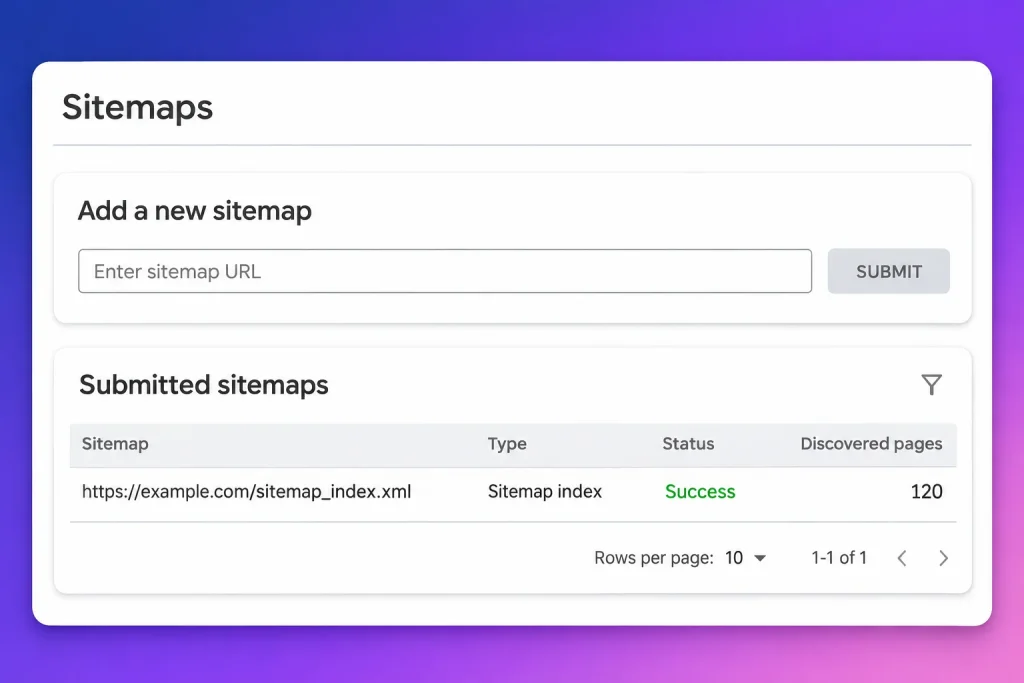
After creating your sitemap, submit it through Google Search Console so Google can discover its location.
Follow these steps:
- Open Google Search Console.
- Select your verified website property.
- Find the Sitemaps section in the left-hand menu.
- Enter your sitemap URL, such as
sitemap_index.xml. - Click Submit.
- Review the submission status.
After submission, Google may show information about the sitemap, including its status and the number of discovered URLs.
Remember that successful sitemap submission does not guarantee that every URL will be indexed.
How to Submit Your XML Sitemap to Bing Webmaster Tools
You can also submit your sitemap to Bing Webmaster Tools.
- Open Bing Webmaster Tools.
- Sign in and select your website.
- Open the Sitemaps section.
- Click the option to submit a sitemap.
- Enter your complete sitemap URL.
- Submit it and review its status.
Submitting your sitemap helps Bing discover the URLs listed in your file.
Common XML Sitemap Errors and How to Fix Them
Even when a sitemap is generated automatically, technical issues can affect its accuracy.
Here are some common problems and their possible solutions.
| Sitemap Error | How to Fix It |
|---|---|
| 404 URLs | Remove deleted or unavailable URLs from the sitemap. |
| Redirected URLs | Replace redirecting URLs with their final destination URLs. |
| Noindex URLs | Exclude pages that have a noindex directive. |
| Duplicate URLs | Keep only the preferred canonical version. |
| Incorrect lastmod dates | Update dates to reflect genuine significant changes. |
| Sitemap cannot be fetched | Check the sitemap URL, server response, and access restrictions. |
| Missing important pages | Review sitemap settings and include eligible pages. |
| Incorrect URL format | Make sure URLs use the correct domain and protocol. |
How to Monitor Sitemap Issues
Regular monitoring helps you identify problems before they affect your website’s technical SEO.
You can use:
- Google Search Console: Review sitemap submission status and indexing reports.
- Bing Webmaster Tools: Check sitemap submission and crawl-related information.
- XML Sitemap Validator: Check whether your sitemap follows the required XML structure.
- Website Crawling Tools: Identify broken URLs, redirects, canonical issues, and non-indexable pages.
For a broader technical review, read our guide on why an SEO audit is important for business growth.
XML Sitemap Optimization Checklist
Before submitting or reviewing your sitemap, use this checklist:
- Include only important, canonical URLs.
- Exclude noindex pages and redirected URLs.
- Remove broken and unavailable URLs.
- Use accurate last modified dates.
- Keep the sitemap updated when content changes.
- Follow the 50,000 URL and 50 MB limits.
- Use a sitemap index for larger websites.
- Add the sitemap location to robots.txt.
- Submit the sitemap to Google Search Console.
- Submit the sitemap to Bing Webmaster Tools.
- Review sitemap errors regularly.
FAQ About XML Sitemap Optimization
1. What is the main purpose of an XML sitemap?
An XML sitemap helps search engines discover important URLs on your website. It provides a structured list of pages that crawlers can use during the discovery process. It is particularly useful for large websites, new websites, and pages that are not easily discovered through internal links.
2. Does an XML sitemap improve Google rankings?
An XML sitemap does not directly guarantee better Google rankings. Its main purpose is to help search engines discover website URLs. Ranking depends on other factors, including content quality, relevance, technical SEO, website usability, and backlinks.
3. How often should I update my XML sitemap?
Your XML sitemap should update whenever important website content is added, changed, or removed. Most SEO plugins automatically update WordPress sitemaps when new posts or pages are published. You should still review your sitemap regularly to check for incorrect or unnecessary URLs.
4. What is the difference between an XML sitemap and an HTML sitemap?
An XML sitemap is mainly created for search engine crawlers. It provides URLs in a structured XML format. An HTML sitemap is designed for website visitors and helps them navigate important sections and pages of a website.
5. Can I have multiple XML sitemaps on one website?
Yes. Websites can use multiple sitemap files to organize different content types, such as posts, pages, products, and images. A sitemap index file can list these individual sitemap files in one central location. This is especially useful for websites with many URLs.
6. How do I check if Google has processed my sitemap?
Open Google Search Console, select your website, and visit the Sitemaps section. Check the submission status and the discovered URL information. For individual pages, use the URL Inspection tool to review their indexing status.
Conclusion
XML sitemap optimization is an important part of maintaining a technically healthy website. A clean sitemap helps search engines discover important pages, understand when content has changed, and access your website’s structure more efficiently.
Focus on including canonical and indexable URLs, removing unnecessary pages, maintaining accurate modification dates, and checking sitemap errors regularly. If you use WordPress, tools such as Rank Math can simplify sitemap creation and management.
For businesses that want to improve their website’s technical health, working on sitemap optimization alongside other SEO activities can support a stronger search visibility strategy. Explore our professional SEO services to improve your website’s technical foundation and organic search performance.