
What Is Technical SEO?
Technical SEO is the process of improving the technical structure and performance of a website so that search engines can crawl, understand, and index its pages effectively.
Unlike content-focused SEO, technical SEO deals more with what happens behind the visible page. It includes areas such as crawlability, indexing, website architecture, redirects, canonical URLs, XML sitemaps, robots.txt, structured data, mobile usability, performance, and security.
Semrush defines technical SEO around optimizing website infrastructure so search engines and AI systems can crawl, render, index, and understand content. Ahrefs similarly explains that technical SEO helps search engines find, crawl, understand, and index website pages.
A technically strong website does not automatically guarantee high rankings. However, if important pages cannot be crawled or indexed properly, even excellent content may struggle to receive organic visibility.
Why Is Technical SEO Important?
Think of your website as a building.
Your content is what visitors come to see, but the technical structure is what helps them—and search engines—move through the building.
If important pages are blocked, links are broken, URLs are confusing, or the website performs poorly, both users and search engines can face difficulties.
Technical SEO helps create a strong foundation for businesses investing in SEO services, because search engines need to access and understand important website pages properly.
- Search engines can discover important pages
- Pages can be crawled efficiently
- Relevant pages can be indexed
- Website structure is easier to understand
- Users can access pages smoothly
- Important technical problems can be identified
- Search engines can better interpret website content
Google’s documentation explains that technical requirements are part of making a website accessible to Google Search, while its SEO guidance covers areas such as crawlability, indexing, and site structure.
9 Essential Technical SEO Factors
1. Crawlability
Crawlability refers to whether search engine crawlers can access the pages and resources on your website.
Search engines discover pages through links and other signals. If important pages cannot be reached by crawlers, they may not be properly discovered and processed.
Common crawlability problems include:
- Incorrect robots.txt rules
- Orphan pages
- Broken internal links
- Poor website architecture
- Pages hidden behind access restrictions
- Incorrect redirects
- Unnecessary URL variations
Ahrefs distinguishes crawlability from indexability: crawlability is about whether a crawler can access a page, while indexability concerns whether that page can be processed and included in the search index.
What to check
Make sure important pages:
- Are linked internally
- Are not accidentally blocked
- Can be accessed without unnecessary barriers
- Are included in an appropriate sitemap
- Do not depend entirely on problematic navigation methods
2. Indexability
A page can be accessible to a crawler but still have signals that prevent it from appearing in search.
This is where indexability becomes important.
Search engines need to discover and process a page before deciding whether it belongs in their index. Technical SEO therefore involves checking whether the pages you actually want in search are indexable.
Pay attention to:
noindexdirectives- Canonical tags
- Duplicate URLs
- Redirects
- HTTP status codes
- Sitemap URLs
- Indexing reports in Google Search Console
For example, accidentally adding a noindex directive to an important service page can prevent that page from appearing in search.
Ahrefs recommends checking indexability and using tools such as Google Search Console’s URL Inspection tool to understand how Google has indexed individual URLs.
3. XML Sitemap
An XML sitemap provides search engines with information about URLs that are available for crawling.
It can be especially useful for larger websites, ecommerce websites, or websites with frequently changing content.
A sitemap should generally contain the URLs you want search engines to consider, rather than every URL your website happens to generate.
Regularly check for:
- Broken URLs
- Redirected URLs
- Incorrect canonical URLs
- Non-indexable URLs
- Duplicate entries
- Missing important pages
A sitemap is not a guarantee that a URL will be indexed, but it can help search engines discover important pages.
4. Robots.txt
The robots.txt file gives crawlers instructions about which areas of a website they may or may not access.
This makes it useful—but also easy to misconfigure.
For example, accidentally blocking an important directory could prevent search engine crawlers from accessing pages that you want visible.
A technical SEO audit should therefore review:
- Disallowed paths
- Important page directories
- Sitemap references
- Unnecessary blocking rules
- Whether the rules match the site’s actual SEO goals
Ahrefs notes that robots.txt controls crawler access, but also points out that blocking crawling is not the same thing as preventing a URL from ever being indexed.
So robots.txt should not be treated as a simple replacement for every indexing control.
5. Website Speed and Core Web Vitals
Website performance affects the experience people have when visiting your pages.
Slow pages can create friction, especially on mobile devices and slower connections.
Technical SEO performance work can include:
- Optimizing large images
- Reducing unnecessary scripts
- Improving server response time
- Using browser caching
- Reducing unused resources
- Improving page rendering
- Monitoring Core Web Vitals
Google’s Core Web Vitals focus on loading performance, responsiveness, and visual stability.
However, performance should not be viewed as a single ranking shortcut. It is one part of a broader technical and user-experience picture.
Businesses may also need professional web development services when performance issues are caused by website structure, code, or technical implementation.
A useful approach is to identify pages with actual performance problems and prioritize fixes based on their business and search importance.
6. Mobile SEO
A website should work properly across mobile devices as well as desktop screens.
Mobile SEO involves more than making the page technically responsive.
Check whether:
- Text is readable
- Buttons are easy to use
- Navigation works properly
- Important content is available on mobile
- Images fit the screen
- Forms work correctly
- Pages load efficiently
For many businesses, mobile users represent a major portion of website traffic, so a technical audit should not focus only on the desktop version.
A mobile-friendly website also makes it easier for visitors to complete important actions such as calling, submitting an enquiry, purchasing a product, or navigating to another page.
7. Website Architecture and Internal Links
A well-organized website structure helps users and search engines understand how different pages relate to one another.
For example, a service website might have:
Home → Services → SEO Services → Local SEO
An ecommerce website could use:
Home → Category → Subcategory → Product
This type of hierarchy makes navigation easier and creates logical internal linking opportunities.
Technical SEO checks should look for:
- Orphan pages
- Very deep important pages
- Broken internal links
- Poor navigation
- Unclear URL structures
- Pages with few internal links
Ahrefs notes that website architecture and internal linking help search engines discover, understand, and navigate a site’s content.
8. Canonicalization and Duplicate URLs
A website can sometimes have multiple URLs representing the same or very similar content.
For example:
example.com/product
and
example.com/product?color=blue
could potentially create different URL versions depending on how the site is built.
This can create confusion about which URL should represent the primary version.
Canonical tags can help communicate the preferred URL, while redirects and proper internal linking can also support cleaner URL management.
During a technical SEO audit, check for:
- Duplicate pages
- Incorrect canonical tags
- Self-referencing canonical issues
- Canonical URLs that redirect
- Multiple URL versions
- Inconsistent internal links
Ahrefs explains that Google uses multiple signals when selecting canonical URLs, including canonical tags, redirects, internal links, and sitemap URLs.
9. Structured Data and HTTPS
Two additional technical areas deserve attention: structured data and website security.
Structured Data
Structured data provides machine-readable information about webpage content.
Depending on the website, relevant structured data can help search engines understand things such as:
- Products
- Articles
- Events
- Organizations
- Local businesses
- Recipes
- Reviews
Structured data does not guarantee a rich result, but valid eligible markup can help search engines understand supported content types.
Ahrefs highlights structured data as one of the technical SEO areas that can help search engines understand content and potentially enable search-result enhancements.
HTTPS
HTTPS helps protect data exchanged between a user’s browser and a website.
An SEO audit should check that important pages load securely and that HTTP versions are correctly redirected to the preferred HTTPS versions.
Also check for:
- Mixed-content issues
- Incorrect redirects
- Security certificate problems
- HTTP pages still accessible without proper handling
Technical SEO Checklist
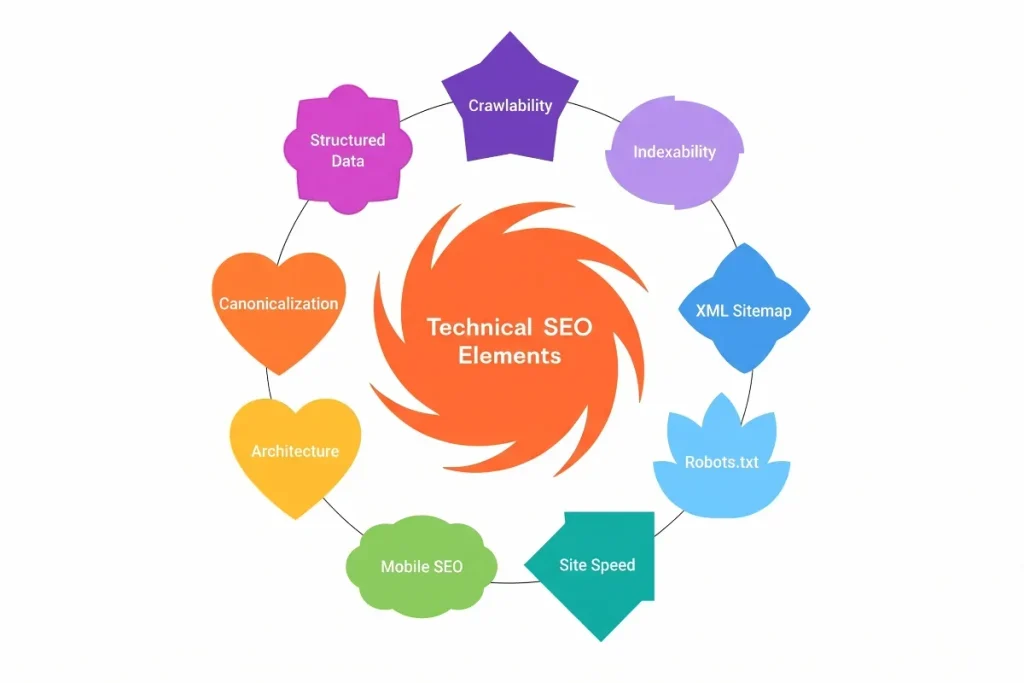
Here is a practical checklist you can use during a website audit:
| Technical SEO Area | What to Check |
|---|---|
| Crawlability | Can search engines access important pages? |
| Indexability | Are important pages eligible for indexing? |
| XML Sitemap | Does it contain correct, important URLs? |
| Robots.txt | Are important sections accidentally blocked? |
| Site Speed | Are important pages performing efficiently? |
| Mobile SEO | Does the site work properly on mobile? |
| Site Architecture | Are pages logically organized? |
| Internal Links | Can important pages be discovered easily? |
| Canonical Tags | Is the preferred URL clear? |
| Redirects | Are redirects working correctly? |
| Structured Data | Is relevant markup implemented correctly? |
| HTTPS | Is the site securely served? |
Technical SEO vs On-Page SEO
Technical SEO and on-page SEO work together, but they focus on different areas.
| Technical SEO | On-Page SEO |
|---|---|
| Crawlability | Content quality |
| Indexability | Keyword targeting |
| Site architecture | Titles |
| XML sitemap | Meta descriptions |
| Robots.txt | Headings |
| Canonicalization | Content structure |
| Page performance | Image optimization |
| Structured data | Search intent |
| HTTPS | Internal content relevance |
For example, an article can have an excellent title, useful information, and strong keyword targeting. But if the page is accidentally marked noindex, those on-page improvements may not result in normal organic visibility.
That is why technical and on-page SEO should not be treated as completely separate activities.
How to Perform a Technical SEO Audit
A technical SEO audit does not have to start with dozens of complicated checks.
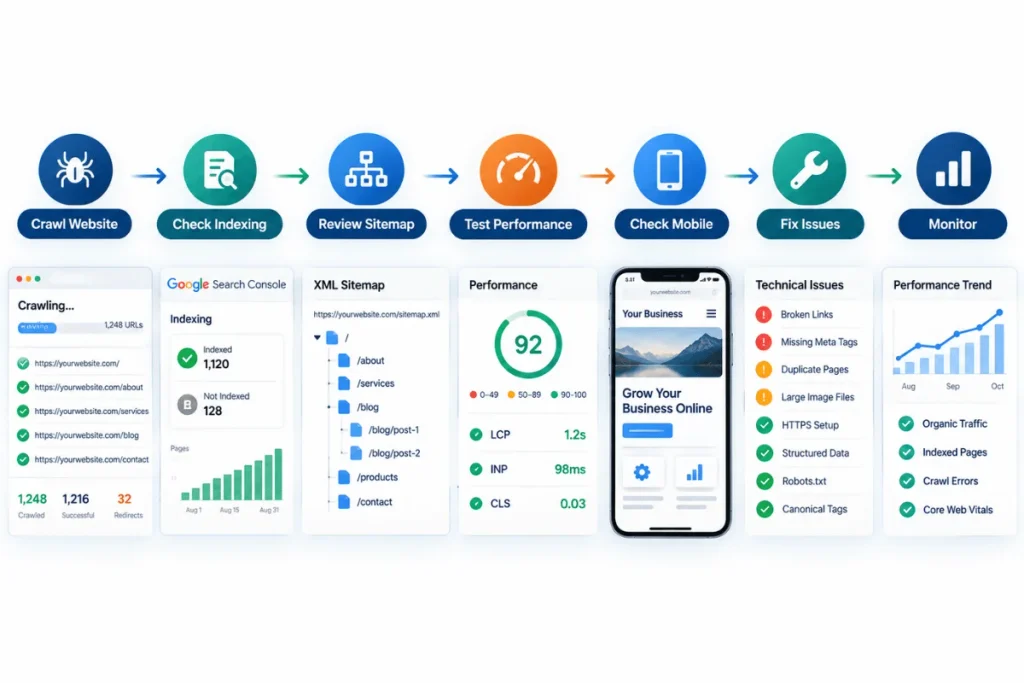
A practical workflow can look like this:
Step 1: Crawl the Website
Use an SEO crawler to identify technical URLs, status codes, redirects, broken links, metadata problems, and other issues.
Step 2: Check Indexing
Use Google Search Console to review indexing information and inspect important URLs.
Step 3: Review Robots.txt and Sitemap
Check whether important pages are accessible and whether the sitemap contains appropriate URLs.
Step 4: Check Website Architecture
Look for orphan pages, deep pages, broken internal links, and navigation problems.
Step 5: Review Performance
Identify important pages with loading or Core Web Vitals issues and prioritize improvements.
Step 6: Check Mobile Experience
Test important pages across mobile screen sizes and devices.
Step 7: Review Canonicals and Redirects
Make sure duplicate or changed URLs are handled correctly.
Step 8: Check Structured Data and HTTPS
Validate relevant structured data and confirm that important pages use secure HTTPS connections.
Step 9: Prioritize Fixes
Not every technical issue deserves the same priority.
Start with issues that can directly prevent important pages from being crawled, indexed, or accessed properly.
Ahrefs similarly recommends prioritizing indexability and other issues that can directly affect organic visibility rather than treating every technical warning as equally important.
A technical SEO audit should not be treated as a one-time activity; ongoing SEO helps businesses monitor and improve technical health as websites change.
Common Technical SEO Mistakes
Blocking Important Pages
A poorly configured robots.txt file or noindex directive can affect pages you actually want in search.
Ignoring Orphan Pages
A page without useful internal links can be harder for crawlers and users to discover.
Treating Every Audit Warning as Critical
SEO tools can generate large numbers of warnings. A warning does not automatically mean the website has a serious ranking problem.
Prioritize based on impact.
Forgetting Redirects After URL Changes
Changing URLs without properly handling old URLs can create broken links and poor user journeys.
Ignoring Mobile Performance
A website that works well on desktop but poorly on mobile can create a poor experience for a large part of its audience.
Using Structured Data Incorrectly
Adding schema markup does not mean every page will receive a rich result. The markup needs to accurately represent the visible page content and follow the relevant guidelines.
Technical SEO in the Age of AI Search
Technical SEO is also becoming relevant beyond traditional search engines.
The current competitor landscape increasingly discusses AI search alongside traditional search. Semrush’s 2026 technical SEO guide specifically discusses how website infrastructure affects whether search engines and AI systems can crawl, render, and understand content.
Ahrefs also notes that AI search still depends on crawlable, well-structured, accessible web pages.
That does not mean there is a separate magic “AI SEO” checklist that guarantees visibility in AI answers.
The practical foundation remains important:
Accessible → Crawlable → Understandable → Indexable → Well-structured
This makes technical SEO a useful foundation for both traditional search and newer search experiences.
Mini Example: A Technical SEO Problem
Imagine an ecommerce website has 500 product pages.
The business creates great product descriptions and optimizes titles and images.
However, during a technical audit, the SEO team discovers that:
- Some product URLs are not internally linked.
- Several URLs return 404 errors.
- Some pages have incorrect canonical tags.
- The sitemap contains redirected URLs.
- Mobile product pages load slowly.
The problem is not simply a lack of content.
The website has a technical foundation problem.
The team can prioritize fixing the indexability and URL issues first, clean the sitemap, improve internal linking, and then address performance problems.
This illustrates an important point:
Technical SEO is not about fixing every warning at once. It is about identifying technical problems that affect how search engines and users access the website and then prioritizing them.
How iBirds Digital Can Help With Technical SEO
Technical SEO is already part of the SEO services offered by iBirds Digital. Its current SEO service page describes technical audits using tools such as Screaming Frog and Semrush, along with identifying and fixing website SEO issues. It also lists on-page SEO, off-page SEO, local SEO, keyword research, content creation, and performance analysis as part of its broader SEO approach.
For businesses looking for a broader strategy, iBirds Digital also provides digital marketing services that combine SEO with content, PPC, social media, and website development.
You can also connect this article naturally with your ongoing SEO article because technical SEO is one of the areas that should be monitored and improved over time.
FAQs About Technical SEO
1. What is technical SEO in simple words?
Technical SEO is the process of improving the technical parts of a website so search engines can access, understand, and index its pages properly. It includes areas such as crawlability, indexing, website structure, performance, redirects, canonical URLs, and security. It works alongside content and other SEO activities.
2. Is technical SEO important for every website?
Technical SEO is relevant to almost every website that depends on organic search visibility. The amount of work required can vary significantly depending on the website’s size, technology, structure, and complexity. A small website may need a relatively simple technical setup, while a large ecommerce website may require much deeper technical management.
3. What are the most important technical SEO factors?
Important areas include crawlability, indexability, website architecture, XML sitemaps, robots.txt, redirects, canonicalization, mobile usability, website performance, structured data, and HTTPS. The priority should depend on the actual problems found during an audit.
4. Does technical SEO improve rankings?
Technical SEO can remove barriers that prevent search engines from properly accessing, processing, or understanding a website. However, technical SEO alone does not guarantee higher rankings. Content relevance, quality, links, competition, search intent, and many other factors also influence search performance.
5. How often should a technical SEO audit be performed?
The ideal frequency depends on how often a website changes. A large ecommerce site with frequent product and URL changes may need more regular monitoring, while a small business website may require less frequent full audits. Important technical issues should still be monitored continuously.
6. Do I need coding knowledge for technical SEO?
Basic technical SEO can be understood without advanced programming skills. However, more complex issues involving JavaScript rendering, server configuration, redirects, structured data implementation, or website architecture may require help from a developer or experienced technical SEO professional.
Final Takeaway
Technical SEO is the foundation that helps search engines find, crawl, understand, and index your website.
It covers much more than website speed.
From crawlability and indexability to sitemaps, robots.txt, internal links, canonical URLs, mobile usability, structured data, and HTTPS, technical SEO helps ensure that the infrastructure supporting your content is working correctly.
The most useful approach is not to chase every technical warning generated by an SEO tool. Instead, identify the issues that can affect important pages, prioritize them based on impact, fix them correctly, and continue monitoring the website as it changes.
For businesses investing in organic search, technical SEO should be treated as an ongoing part of website maintenance—not a one-time checkbox.